C-17 Globemaster III Home Simulators: The Complete Guide
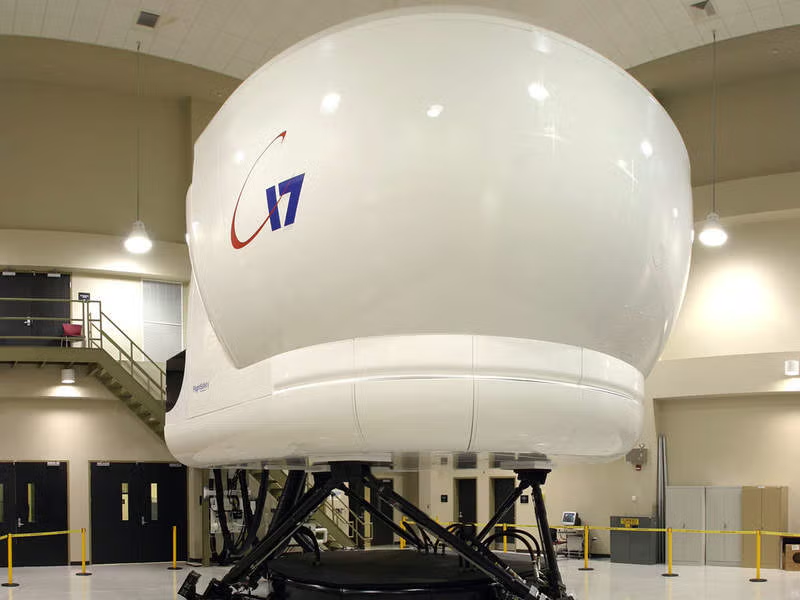
Flying the C-17 Globemaster III was once reserved for military pilots with years of training. Today, flight simulation technology has advanced to the point where aviation enthusiasts can experience this incredible aircraft from their home computer. This guide covers the best C-17 simulator options available for home use in 2024 and 2025.
Microsoft Flight Simulator 2024: The Premium Option
The most realistic C-17 experience for home users comes from Miltech Simulations, whose Boeing C-17A Globemaster III is included in the Microsoft Flight Simulator 2024 Premium Package. This marks Miltech’s first official collaboration with Microsoft, bringing professional-grade simulation to the consumer market.
The Miltech C-17A features:
- Audio recorded from an actual C-17A aircraft
- Fully functional displays and systems
- Realistic flight dynamics based on real-world data
- High-fidelity exterior and interior modeling
For serious enthusiasts willing to invest in the premium package, this represents the gold standard for home C-17 simulation.
Delta Simulations C-17: The Free Alternative
For those seeking an exceptional C-17 experience without the premium price tag, Delta Simulations offers a remarkable free option for Microsoft Flight Simulator 2020. This community-driven, open-source project represents over three years of dedicated development.
What makes the Delta Simulations C-17 special:
- Fully custom avionics suite modeled on the real aircraft
- Functional external and internal lighting systems
- Native WWise sound system for immersive audio
- State-saving functionality between sessions
- Electronic Flight Bag (EFB) integration
- Simulated system failures for training scenarios
- External elements like cones and “remove before flight” tags
The developers worked with real-world C-17 operators and compiled thousands of references to create what they describe as “the most accurate C-17 simulation available for the civilian market.” The project is actively maintained through GitHub, with regular updates and improvements.
Hundreds of free community-created liveries are available, allowing you to fly in the colors of various air forces worldwide including USAF, RAF, RAAF, and many others.
FSX and Prepar3D Options
For users still running Flight Simulator X or Prepar3D, several C-17 options remain available:
Steam Edition Add-On
The official C-17 Globemaster III add-on for FSX Steam Edition provides a solid representation of the aircraft with accurate exterior modeling and basic systems simulation. This is a straightforward option for FSX users looking to add military transport capability to their hangar.
Virtavia C-17A Globemaster III
Virtavia specializes in military aircraft add-ons and offers a payware C-17A compatible with FSX, Prepar3D, and X-Plane. This option provides more detailed systems and better compatibility across multiple simulator platforms.
X-Plane Options
X-Plane users have fewer dedicated C-17 options, but the Virtavia add-on mentioned above offers X-Plane compatibility. The X-Plane platform’s excellent flight dynamics engine means even basic C-17 models can provide satisfying flight characteristics.
Hardware Recommendations
To get the most out of your C-17 simulation experience, consider these hardware upgrades:
Flight Controls
- Yoke: A quality yoke like the Honeycomb Alpha provides realistic control feel for transport aircraft
- Throttle Quadrant: A four-engine throttle setup enhances immersion for the C-17’s four Pratt & Whitney engines
- Rudder Pedals: Essential for proper crosswind landings and ground handling
System Requirements
Microsoft Flight Simulator 2024 with the C-17 add-on requires a capable system:
- Modern multi-core processor (Intel i7 or AMD Ryzen 7 recommended)
- 32GB RAM for smooth performance
- RTX 3070 or better graphics card
- Fast SSD storage for reduced loading times
Training Value
While home simulators cannot replace actual flight training, they offer significant value for:
- Procedure Practice: Learn cockpit flows and checklist procedures
- Systems Familiarization: Understand how C-17 systems interact
- Navigation Training: Practice flight planning and navigation procedures
- Emergency Procedures: Rehearse emergency responses in a safe environment
Several military pilots have reported using home simulators to maintain proficiency during periods away from the aircraft, though these sessions don’t count toward official currency requirements.
Getting Started
For those new to C-17 simulation, here’s a recommended progression:
- Start with the free Delta Simulations C-17 for MSFS 2020 to learn the basics
- Join online communities like the Delta Simulations Discord for tips and support
- Study real C-17 procedures using publicly available materials
- Practice short-field operations – the C-17’s specialty
- Upgrade to Miltech’s premium version when ready for maximum realism
Conclusion
The availability of high-quality C-17 simulators for home use represents a remarkable achievement in flight simulation. Whether you choose the free Delta Simulations option or invest in the premium Miltech package, you can experience one of the world’s most capable military transport aircraft from your desktop.
The combination of realistic flight dynamics, accurate systems modeling, and stunning visuals in modern simulators provides an experience that would have been unimaginable just a decade ago. For C-17 enthusiasts, aspiring military aviators, or anyone fascinated by heavy military transport operations, these simulators offer an accessible window into the world of Globemaster operations.
Recommended Flight Sim Accessories
C-17 Globemaster III: Legends of Warfare
280+ photos, complete aircraft history
