Best C-17 Flight Simulator Addons in 2026: Complete Comparison Guide

Flying a C-17 Globemaster III from your home cockpit is now possible thanks to dedicated flight simulator developers. This comprehensive guide compares every C-17 addon available across Microsoft Flight Simulator, X-Plane, FSX, and Prepar3D—covering features, realism, pricing, and which option best fits your setup.

Last Updated: January 2026

Quick Comparison: All C-17 Simulator Options

Addon Platform Price Our Rating
Delta Simulations C-17 MSFS 2020/2024 FREE ⭐⭐⭐⭐⭐ Best Overall
Virtavia C-17 X-Plane 11 $29.95 ⭐⭐⭐ Mixed Reviews
Virtavia C-17A FSX/P3D $34.95 ⭐⭐⭐⭐ Solid Choice
Steam C-17 Add-On FSX Steam $24.99 ⭐⭐⭐ Decent
UKMIL C-17 FSX FREE ⭐⭐⭐ Good Freeware

The Winner: Delta Simulations C-17 for MSFS

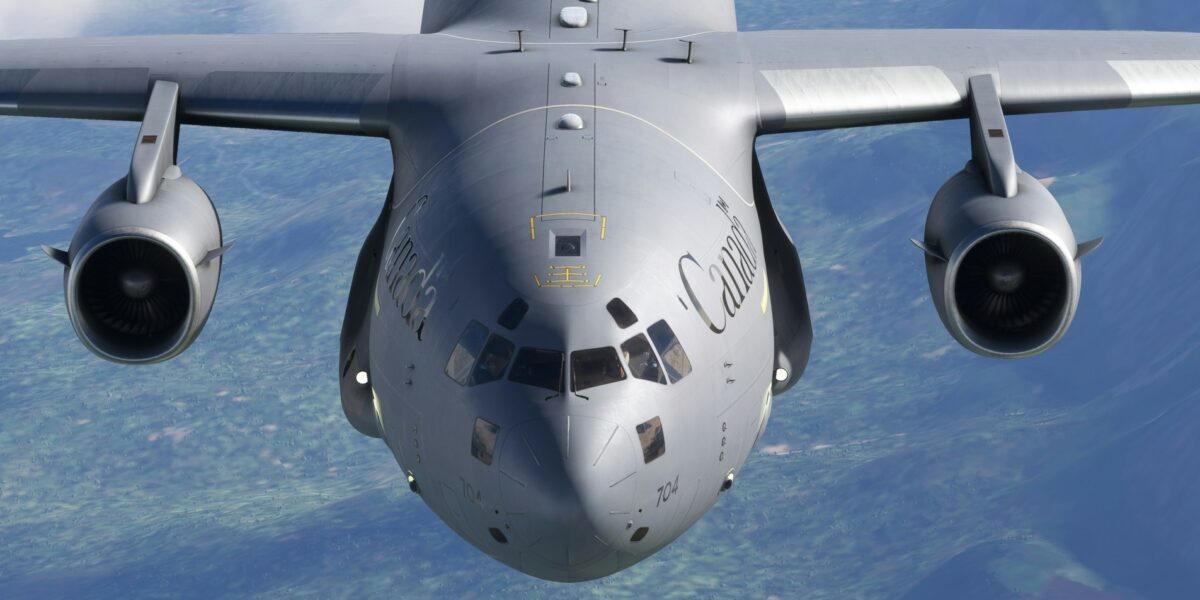
If you’re serious about flying the C-17 at home, the Delta Simulations C-17 for Microsoft Flight Simulator is the clear choice. It’s not just the best free option—it rivals payware quality in many aspects.

Why Delta Simulations Stands Out

This community-driven project has been in development for over three years, with input from real-world C-17 operators. The result is the most accurate civilian C-17 simulation available.

Cockpit Accuracy

  • 0.5-inch accuracy to the real aircraft cockpit
  • Developed with assistance from actual C-17 pilots and loadmasters
  • Every switch, dial, and display positioned correctly
  • Custom avionics suite replicating real C-17 systems

Features You’d Expect in Payware

  • State saving: Aircraft remembers switch positions between sessions
  • Electronic Flight Bag (EFB): Tablet interface for settings and checklists
  • Failure simulation: Random and triggered system failures
  • Ground equipment: Cones, chocks, and “remove before flight” tags
  • Native WWise sound: Authentic engine and system sounds

Visual Quality

  • Fully custom 3D model built for MSFS
  • Detailed exterior with accurate panel lines and rivets
  • Functional lighting: landing, nav, beacon, strobe, formation, taxi
  • Multiple liveries available (USAF, RAF, RAAF, and more)

Delta Simulations: Pros and Cons

Pros Cons
  • Completely free
  • Payware-level quality
  • Active development and updates
  • Real pilot input on accuracy
  • Excellent Discord community support
  • Open source (can be modified)
  • Regular livery additions
  • MSFS 2024 compatibility still being worked on
  • Steep learning curve (realistic systems)
  • Requires decent PC specs
  • Some systems still in development
  • No cargo loading simulation yet

Download and Installation

Official Sources:

Installation Steps:

  1. Download the latest release (deltasimulations-c17.zip)
  2. Extract to your MSFS Community folder
  3. Launch MSFS and select the C-17 from the aircraft menu
  4. Read the included documentation for systems operation

X-Plane Option: Virtavia C-17

For X-Plane users, Virtavia offers a payware C-17 Globemaster III. However, user reviews are mixed.

Virtavia C-17 for X-Plane: Honest Assessment

Aspect Assessment
Price $29.95
X-Plane 11 Compatibility Problematic – users report issues
X-Plane 12 Compatibility Not officially supported
Visual Quality Decent exterior, dated cockpit
Systems Depth Basic – not study-level
Recommendation Wait for updates or choose MSFS instead

Our Take: If X-Plane is your only option, the Virtavia C-17 provides a basic C-17 experience. But given the compatibility issues and the superior free alternative in MSFS, we recommend switching platforms if C-17 simulation is your priority.

FSX and Prepar3D Options

Virtavia C-17A for FSX/P3D

This is Virtavia’s more polished offering, optimized for FSX and Prepar3D v4/v5.

Key Features:

  • 2048×2048 texture resolution
  • FSX/P3D SDK optimization
  • Bloom effects, self-shadowing, bump mapping
  • Multiple variants and liveries
  • Functional virtual cockpit

Pros and Cons

Pros Cons
  • Well-optimized for P3D v5
  • Good visual quality for the platform
  • Includes multiple liveries
  • Stable and mature product
  • $34.95 price tag
  • Systems not study-level
  • Aging platform (FSX/P3D)
  • Less active development

Steam C-17 Add-On for FSX

Available on Steam for FSX: Steam Edition users.

  • Price: $24.99
  • Reviews: 74% positive (Mostly Positive)
  • Platform: FSX: Steam Edition only

Best For: Casual simmers who already own FSX on Steam and want a quick C-17 experience without the complexity of study-level systems.

UKMIL C-17 (Free for FSX)

A free option for FSX users featuring:

  • Gmax-built 3D model
  • Functional virtual cockpit
  • Subtle wing flex animation
  • Basic systems simulation

Best For: FSX users who want to try C-17 flying without investment.

Platform Comparison: Which Simulator Should You Use?

Platform C-17 Quality Scenery Cost Verdict
MSFS 2020 ⭐⭐⭐⭐⭐ ⭐⭐⭐⭐⭐ $69.99 + Free C-17 RECOMMENDED
MSFS 2024 ⭐⭐⭐⭐ (WIP) ⭐⭐⭐⭐⭐ $69.99+ Wait for C-17 update
X-Plane 12 ⭐⭐ (No good option) ⭐⭐⭐⭐ $59.99 Not recommended for C-17
Prepar3D v5 ⭐⭐⭐⭐ ⭐⭐⭐ $59.95 + $34.95 Good if you already own P3D
FSX ⭐⭐⭐ ⭐⭐ $24.99 (Steam) Budget option only

System Requirements for C-17 Simulation

The Delta Simulations C-17 is a complex aircraft that benefits from capable hardware:

Minimum (for MSFS + Delta C-17)

  • CPU: Intel i5-8400 / AMD Ryzen 5 2600
  • GPU: NVIDIA GTX 1070 / AMD RX 5700
  • RAM: 16GB
  • Storage: SSD with 150GB+ free space

Recommended

  • CPU: Intel i7-12700K / AMD Ryzen 7 5800X
  • GPU: NVIDIA RTX 3070 / AMD RX 6800
  • RAM: 32GB
  • Storage: NVMe SSD

What’s Missing: Features We’d Like to See

Even the excellent Delta Simulations C-17 has room for growth:

  • Cargo loading simulation: Weight and balance calculations with loadable pallets
  • Airdrop operations: Simulated personnel and cargo drops
  • Air refueling: Connection with tanker aircraft
  • Multi-crew: Shared cockpit for pilot/copilot training
  • MSFS 2024 native: Full compatibility with the latest simulator

The Bottom Line

For C-17 home simulation in 2026, the path is clear:

  1. Best Experience: Microsoft Flight Simulator 2020 + Delta Simulations C-17 (Free)
  2. Alternative: Prepar3D v5 + Virtavia C-17A ($34.95)
  3. Budget: FSX Steam Edition + Steam C-17 Add-On ($24.99)
  4. Avoid: X-Plane C-17 options until better addons are developed

The Delta Simulations team has created something remarkable—a free addon that matches or exceeds payware quality. Combined with MSFS’s stunning visuals and global scenery, you can fly the C-17 anywhere in the world from your home cockpit.

Have questions about C-17 simulation? Join the Delta Simulations Discord or reach out via our contact page.

Jason Michael

Jason Michael

Author

Jason Michael is a Pacific Northwest gardening enthusiast and longtime homeowner in the Seattle area. He enjoys growing vegetables, cultivating native plants, and experimenting with sustainable gardening practices suited to the region's unique climate.

✈️ Get the latest C-17 news & insider content

Shop C-17 Gear

Subscribe for Updates

Get the latest articles delivered to your inbox.