Best Flight Sim Hardware for C-17 Flying: Yokes, Throttles, and Pedals
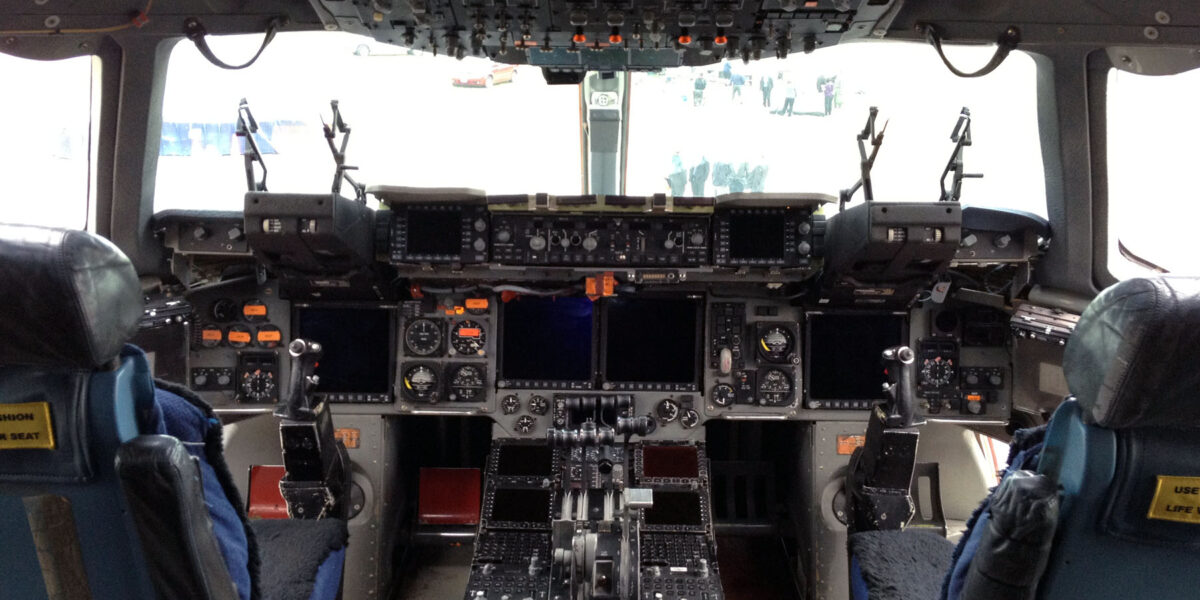
Building a home cockpit capable of realistically simulating the C-17 Globemaster III requires the right hardware. This guide covers the best flight controllers, throttle quadrants, rudder pedals, and accessories for C-17 simulation—from budget-friendly options to professional-grade equipment.
Last Updated: January 2026
What Makes C-17 Simulation Different
The C-17 has unique characteristics that influence hardware choices:
- Four engines: Ideally requires a throttle quadrant with 4 levers
- Yoke-based controls: Not a sidestick aircraft—uses traditional yoke
- Heavy aircraft handling: Requires smooth, precise inputs
- Thrust reversers: Essential for realistic landing operations
- Complex systems: Benefits from button boxes and switch panels
Quick Recommendations by Budget
| Budget | Total Cost | Setup |
|---|---|---|
| Entry Level | $150-250 | Logitech Extreme 3D Pro + Keyboard |
| Intermediate | $400-600 | Honeycomb Alpha Yoke + Bravo Throttle |
| Enthusiast | $800-1,200 | Honeycomb + Rudder Pedals + Multi-Monitor |
| Professional | $2,000+ | Full cockpit with switch panels and VR |
Yokes: The Most Important Investment
The C-17 uses a traditional yoke (not a sidestick). For realistic simulation, a quality yoke is essential.
Best Overall: Honeycomb Alpha Flight Controls
The Honeycomb Alpha has become the gold standard for mid-range flight simulation.
| Specification | Details |
|---|---|
| Price | ~$279 |
| Build Quality | All-metal yoke shaft, quality switches |
| Buttons/Switches | 11 buttons, 2 toggle switches, ignition switch |
| Movement | Smooth 180° rotation, linear pitch |
| C-17 Suitability | ⭐⭐⭐⭐⭐ Excellent |
Why it’s great for C-17: The smooth, precise movement replicates the fly-by-wire feel of the real aircraft. The integrated switch panel handles essential functions without reaching for the keyboard.
Budget Option: Logitech G Pro Flight Yoke
| Specification | Details |
|---|---|
| Price | ~$179 |
| Build Quality | Plastic with metal shaft |
| Included | Yoke + basic throttle quadrant |
| C-17 Suitability | ⭐⭐⭐ Acceptable |
Pros: Includes throttle quadrant, good entry point
Cons: Only 3 throttle levers (C-17 has 4 engines), plastic construction
Premium Option: Turtle Beach VelocityOne Flight
A newer competitor with innovative features.
| Specification | Details |
|---|---|
| Price | ~$379 |
| Build Quality | All-in-one integrated design |
| Unique Features | Integrated throttle, display screen, modular |
| C-17 Suitability | ⭐⭐⭐⭐ Very Good |
Throttle Quadrants: Four Engines Matter
The C-17 has four engines. While you can map two throttle levers to control all four, individual engine control adds realism—especially for engine-out scenarios.
Best for C-17: Honeycomb Bravo Throttle Quadrant
The Bravo is specifically designed for multi-engine operations.
| Specification | Details |
|---|---|
| Price | ~$249 |
| Throttle Levers | 6 axes (perfect for 4 engines + 2 extras) |
| Switches | Autopilot panel, flap lever, gear lever, trim wheel |
| Annunciators | LED warning lights (gear, autopilot, etc.) |
| C-17 Suitability | ⭐⭐⭐⭐⭐ Perfect |
Why it’s ideal for C-17:
- Configure 4 levers for individual engine control
- Remaining 2 levers can be speedbrake and thrust reverse
- Autopilot panel mirrors C-17 glareshield controls
- LED annunciators show gear status and warnings
Budget Alternative: Logitech Throttle Quadrant
| Specification | Details |
|---|---|
| Price | ~$69 |
| Throttle Levers | 3 axes |
| Expandable | Yes—can daisy-chain multiple units |
| C-17 Suitability | ⭐⭐⭐ Acceptable (with 2 units) |
Tip: Buy two Logitech quadrants and mount them together for 6 levers—still cheaper than the Bravo.
Rudder Pedals: Essential for Realistic Operations
The C-17 uses rudder pedals for directional control and differential braking. While optional, rudder pedals significantly improve realism.
Best Value: Thrustmaster TFRP Rudder Pedals
| Specification | Details |
|---|---|
| Price | ~$129 |
| Build | Plastic with metal rails |
| Features | Differential brakes, smooth action |
| C-17 Suitability | ⭐⭐⭐⭐ Very Good |
Premium Option: Thrustmaster TPR Pendular Rudder
| Specification | Details |
|---|---|
| Price | ~$549 |
| Build | Full metal construction |
| Features | Pendular movement (like real aircraft), adjustable resistance |
| C-17 Suitability | ⭐⭐⭐⭐⭐ Excellent |
Recommended Complete Setups
Setup 1: Budget C-17 Cockpit (~$300)
- Logitech Extreme 3D Pro Joystick ($49)
- Logitech Throttle Quadrant x2 ($138)
- Keyboard for additional functions
Total: ~$287
Good for: New simmers testing interest in C-17 flying
Setup 2: Recommended C-17 Cockpit (~$700)
- Honeycomb Alpha Yoke ($279)
- Honeycomb Bravo Throttle ($249)
- Thrustmaster TFRP Rudder Pedals ($129)
Total: ~$657
Best for: Serious simmers wanting realistic C-17 operations
Setup 3: Enthusiast C-17 Cockpit (~$1,200)
- Honeycomb Alpha Yoke ($279)
- Honeycomb Bravo Throttle ($249)
- Thrustmaster TPR Pendular Rudder ($549)
- Second monitor for EFB/charts ($150)
Total: ~$1,227
Best for: Dedicated C-17 enthusiasts building a semi-permanent setup
Setup 4: Professional C-17 Sim (~$3,000+)
- Honeycomb Alpha Yoke ($279)
- Honeycomb Bravo Throttle ($249)
- Thrustmaster TPR Rudder ($549)
- Elgato Stream Deck for systems control ($149)
- Triple monitor setup ($600)
- VR Headset – HP Reverb G2 ($599)
- Cockpit mount/desk ($300-500)
Total: ~$2,725+
Mounting and Ergonomics
Proper mounting improves immersion and comfort:
Desk Mounting Options
- Honeycomb Desk Mount: Official mount for Alpha/Bravo ($49)
- DIY solutions: Many simmers build custom mounts
- Wheel Stand Pro: Standalone mount for yoke and throttle ($150-200)
Chair Recommendations
For long simulation sessions:
- Gaming chair with lumbar support
- Office chair with adjustable armrests
- Racing seat on sim rig (for dedicated setups)
Software Enhancements
Beyond hardware, these tools enhance C-17 simulation:
- SPAD.neXt: Advanced controller programming and interfacing
- Axis and Ohs: Custom button/switch programming
- SimBrief: Flight planning (integrates with Delta C-17 EFB)
- Navigraph: Current navigation charts and procedures
Controller Mapping Tips for C-17
Essential Bindings
| Function | Recommended Binding |
|---|---|
| Throttle 1-4 | Bravo axes 1-4 |
| Speedbrake | Bravo axis 5 or switch |
| Thrust Reverse | Bravo axis 6 detent |
| Flaps | Bravo flap lever |
| Gear | Bravo gear lever |
| Autopilot Controls | Bravo AP panel |
| View Controls | Hat switch on yoke |
Final Recommendations
For the best C-17 home simulation experience:
- Start with quality yoke: The Honeycomb Alpha is worth the investment
- Prioritize throttle: The Bravo’s 6 axes make C-17 operation realistic
- Add rudder pedals: Essential for crosswind landings and taxi
- Consider ergonomics: A comfortable setup means longer sessions
- Upgrade gradually: Start basic and add equipment as interest grows
The hardware investment pays off in hundreds of hours of realistic C-17 flying. Combined with the free Delta Simulations C-17, you can build a capable home cockpit without breaking the bank.
Have questions about hardware setup? Visit our contact page for recommendations.
Subscribe for Updates
Get the latest articles delivered to your inbox.
We respect your privacy. Unsubscribe anytime.